
Day #14 - Backendless Apps: A Shopify Shortcut
Mouse Whisperer 30 Days of CRO
August 5, 2026
This week I am doing a lot of updates and changes to a Shopify store because a colleague is in town and we are doing a photoshoot… So I won’t be writing anything for the next few days.
But you will get your own backendless app too… if you want… details are right above the code snippet towards bottom of this post.
I thought it would be fun to see some of these ideas in real-time use. So let’s see what ideas you come up with!
Snippet, and Snip it good.
Ok, last year at work, we needed to make it easier for visitors to find their size. We had a super simple size guide that was OK. It worked, but it was lame. And I was new at the company, so I wanted to do something cool.
I did this. It was cool.

When you were on the product page, above the buy button, you’d see this. If you weren’t sure if you were a S M or L, this was an interactive widget to help.
So you click it, and it expands to this:
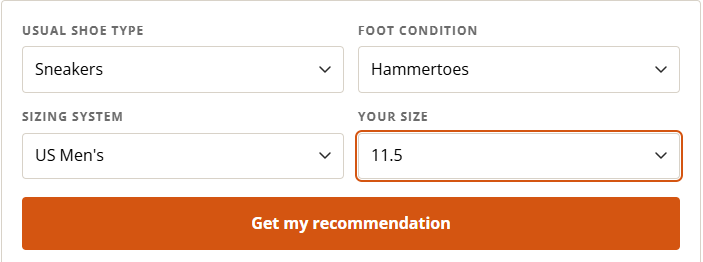
A simple input of info you already know, and BAM!!
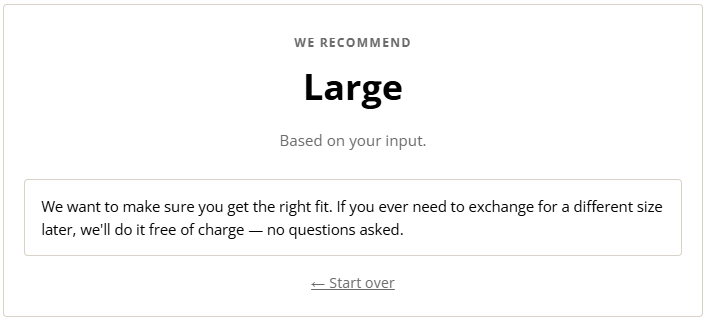
Well, that was simple and fast. Users used it. We loved it. Faster to checkout. Increase in conversions. Fewer customer service tickets.
It looks and feels like an app… like something from 2017 that you would install and pay $5.99/month from the Shopify App Store.
But its not. Well it is.. but it’s not.
What is an app?
There are public apps and there are custom apps… and then there is this franken-app thing up above.
Public apps are what you are used to. They are multi-tenet apps that you install on your store and use there as long as you want to pay. You are a tenet, you pay rent for the functionality.
Custom apps have the same structure as a public app (the apps on the app store) but they can only be installed on 1 Single store… they are great. (I might do a video of how build one for yourself later).
This sizing thingymajig above looks and feels like an app on the surface, but its really just a snippet that is “soft-coded” into the theme via the Custom Liquid section.
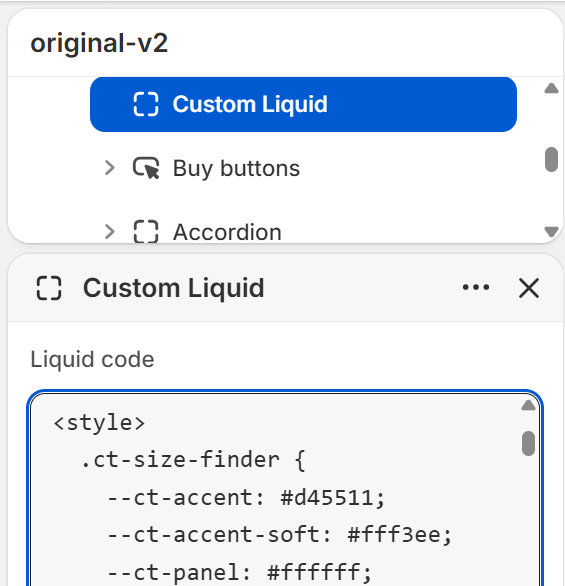
Hard-coding is non-dynamic code that goes directly into the source code. Soft-coding is when you load something externally, like here with the Custom Liquid section. Its flexible, and a single click can hide it. That’s why it is not “hard-coded.”
Their is no database to maintain here. That is why it is called a backendless app. It is all front-end. If this were to become a sizing widget for multiple stores, you’d have to build a whole freaking thing with a database, a shopify admin app to change settings, the frontend would be an App Extension.. the whole bit.
But that is waaaay to much work for something that CAN be handled with this:
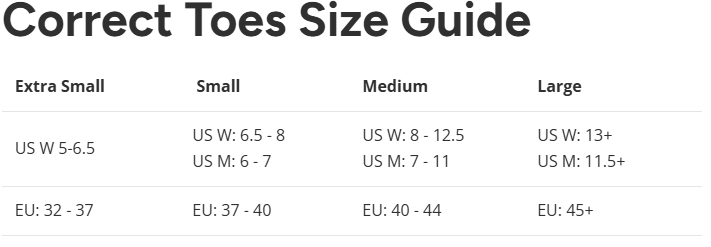
That would be lame. Interactive pages are more fun to use as a customer and more fun to build as an operator.
Let’s do one together.
If you have a Shopify store, copy-paste this snippet below into a Custom Liquid block in the Product Details section. Viola!
If you DON’T have a Shopify store… you can view it on a product page on mine.
Or we can build your idea and share it with the class…
Describe what you would like to build as a backendless app in the comments, and I will either send you the code (if it is a real feature you want to add to your store), or I will add it to a page on my store and share it in a later post…
And to make it easy, just leave it in the comments or reply to this email…
{% liquid
  assign button_label = 'Have your say'
  assign question_text = 'What song is Master Shake jamming to?'
  assign image_src = 'https://cdn.shopify.com/s/files/1/0958/7762/8036/files/giphy_2.gif?v=1785937875'
  assign placeholder_text = 'Song goes here...'
  assign submit_label = 'Submit'
  assign success_text = 'Oh snap, that is a great song!'
%}

<div class="rh-ask" id="rh-ask-{{ section.id }}">
  <details class="rh-ask__details" id="rh-details-{{ section.id }}">
    <summary class="rh-ask__toggle button btn btn--primary" role="button">{{ button_label }}</summary>

    <div class="rh-ask__panel">
      <div class="rh-ask__panel-inner">
        {% form 'contact', id: 'rh-form', class: 'rh-ask__form' %}
          <img class="rh-ask__image" src="{{ image_src }}" alt="" loading="lazy" width="800" height="450">

          {% if form.posted_successfully? %}
            <p class="rh-ask__success" data-rh-success>{{ success_text }}</p>
          {% else %}
            {{ form.errors | default_errors }}
            <p class="rh-ask__question">{{ question_text }}</p>
            <input type="hidden" name="contact[email]" value="{{ customer.email | default: shop.email }}">
            <input type="hidden" name="contact[question]" value="{{ question_text | escape }}">
            <label class="visually-hidden" for="rh-answer-{{ section.id }}">{{ question_text }}</label>
            <textarea
              class="rh-ask__input text-area field__input"
              id="rh-answer-{{ section.id }}"
              name="contact[body]"
              rows="5"
              required
              placeholder="{{ placeholder_text }}"
            ></textarea>
            <button type="submit" class="rh-ask__submit button btn btn--primary">{{ submit_label }}</button>
          {% endif %}
        {% endform %}
      </div>
    </div>
  </details>
</div>

<style>
  #rh-ask-{{ section.id }} .rh-ask__toggle,
  #rh-ask-{{ section.id }} .rh-ask__submit {
    display: block;
    width: 100%;
    box-sizing: border-box;
    cursor: pointer;
    text-align: center;
    background: #ffffff;
    border: 1px solid #ffffff;
    border-radius: 12px;
    color: inherit;
  }
  #rh-ask-{{ section.id }} .rh-ask__toggle {
    list-style: none;
  }
  #rh-ask-{{ section.id }} .rh-ask__toggle::-webkit-details-marker,
  #rh-ask-{{ section.id }} .rh-ask__toggle::marker {
    display: none;
    content: '';
  }
  :where(#rh-ask-{{ section.id }} .rh-ask__toggle),
  :where(#rh-ask-{{ section.id }} .rh-ask__submit) {
    padding: 0.75em 1.5em;
  }
  #rh-ask-{{ section.id }} .rh-ask__panel {
    display: grid;
    grid-template-rows: 0fr;
    transition: grid-template-rows 0.6s ease;
    margin-top: 8px;
  }
  #rh-ask-{{ section.id }} .rh-ask__details.is-open .rh-ask__panel {
    grid-template-rows: 1fr;
  }
  #rh-ask-{{ section.id }} .rh-ask__panel-inner {
    overflow: hidden;
    min-height: 0;
    background: #ffffff;
    border: 1px solid #ffffff;
    border-radius: 12px;
  }
  #rh-ask-{{ section.id }} .rh-ask__form {
    padding: 8px;
  }
  #rh-ask-{{ section.id }} .rh-ask__image {
    display: block;
    width: 100%;
    height: auto;
    margin-bottom: 1rem;
  }
  #rh-ask-{{ section.id }} .rh-ask__question {
    margin: 0 0 1rem;
  }
  #rh-ask-{{ section.id }} .rh-ask__input {
    display: block;
    width: 100%;
    box-sizing: border-box;
    margin-bottom: 1rem;
    font-family: inherit;
    font-size: inherit;
    color: inherit;
    background: transparent;
    resize: vertical;
  }
  :where(#rh-ask-{{ section.id }} .rh-ask__input) {
    padding: 0.75em;
    border: 0.1rem solid currentColor;
    border-radius: 0.4rem;
  }
  #rh-ask-{{ section.id }} .rh-ask__success {
    margin: 0;
  }
  @media (prefers-reduced-motion: reduce) {
    #rh-ask-{{ section.id }} .rh-ask__panel {
      transition: none;
    }
  }
</style>

<script>
  (function () {
    var root = document.getElementById('rh-ask-{{ section.id }}');
    if (!root) return;
    var details = root.querySelector('details');
    var summary = root.querySelector('summary');
    var panel = root.querySelector('.rh-ask__panel');
    if (!details || !summary || !panel) return;

    summary.addEventListener('click', function (e) {
      e.preventDefault();
      if (details.open) {
        details.classList.remove('is-open');
        panel.addEventListener(
          'transitionend',
          function () {
            if (!details.classList.contains('is-open')) details.open = false;
          },
          { once: true }
        );
      } else {
        details.open = true;
        requestAnimationFrame(function () {
          requestAnimationFrame(function () {
            details.classList.add('is-open');
          });
        });
      }
    });

    if (root.querySelector('[data-rh-success]') || root.querySelector('.errors')) {
      details.open = true;
      details.classList.add('is-open');
    }
  })();
</script>
Ok that it all for now… see you in a few days
- Shep
Originally sent as an email — view on Substack.
Get the next one by email
New issues go out as they are written. No schedule, no filler.